Managing an in-house data center requires time, IT expertise, and a high budget, which is why businesses typically prefer to run operations from a third-party facility. While colocation may be a natural choice for many companies, choosing the right provider is not simple.
This article is a guide on how a business should approach data center selection. We outline the key factors to consider when choosing a colocation facility and offer guidance on finding a partner that meets your business needs.
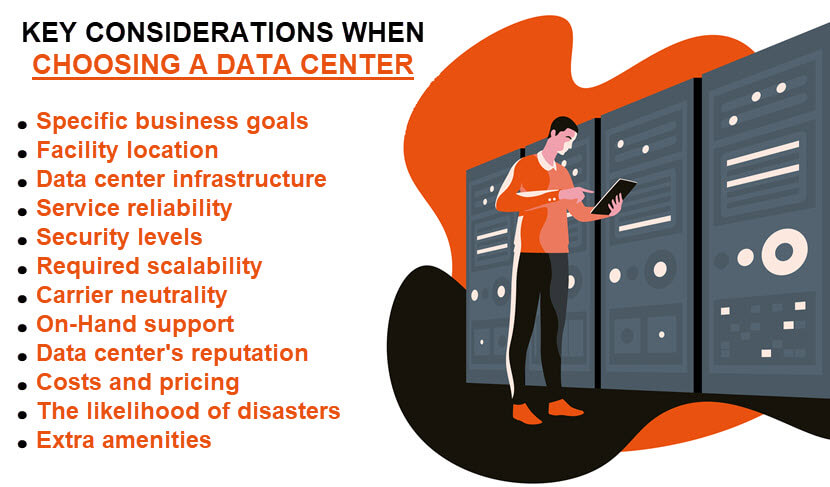
12 Key Considerations When Choosing a Data Center
There are many benefits to setting up your equipment in a colocation facility:
- Decreased capital costs when compared to an in-house data center.
- Simpler management with little to no regular maintenance.
- Greater reliability with less chance of downtime.
- High levels of flexibility and scalability.
- An opportunity to focus on avenues other than running a data center, such as IT improvements and innovation.
Despite these advantages, benefiting from colocation depends on your ability to evaluate business needs and find the right partner. The data center selection factors below will help you assess your options and make an informed decision.
Our article on colocation hosting offers an in-depth look at how this hosting type works and what benefits it offers when compared to an in-house data center.
Your Goals and Needs
Clarify what your goals are and what you aim to achieve by partnering with a third-party data center. Consult every relevant team in your company as different departments have varying needs and expectations. Discuss data center needs with your:
- Upper management.
- Network admins.
- SecOps and DevOps teams.
- Software developers.
Advising with different stakeholders provides a complete picture of your data center requirements. For example, upper management may not know about problems technicians face, such as insufficient monitoring or alerting. On the other hand, technicians may not be privy to some long-term business objectives.
Once you consult with different stakeholders, prioritize the requirements, and create a list of long-term, high-level goals of partnering with a data center, such as:
- Enhancing data center uptime.
- Improving app performance.
- Reducing the time the team spends on managing the IT setup.
- Enhancing overall cybersecurity.
Once you know your goals, consider the size of your budget. Decide how much you can spend on colocation services and how long a contract term you can handle.
Facility Location
Facility location is vital to the reliability and safety of your IT equipment. Here are the primary location-related considerations you need to account for when searching for a data center:
- The distance between your organization and the data center impacts Internet speed. This problem is not as notable with fiber wiring as these cables do not experience issues until the 25-mile mark. However, setting up in a facility a few states away from your customer base can cause problems.
- Ideally, the data center should be easily accessible to your IT staff. Trips to a distant location can be a problem for regular maintenance and emergencies, plus you will need to cover the trip expenses.
- You may need a data center close to the source of your data generation to avoid latency issues.
- Find a data center that does not run on the same power grid as your business. That way, a regional power outage will not affect both the data and your company's office.
- Look for a data center in an area that is not prone to natural disasters (tornados, earthquakes, floods, tsunamis, etc.).
Although you could save money by signing up with a center that is further away, setting up your equipment in a nearby facility is typically a better business move.
Learn about edge computing, a tech that brings data processing closer to the network's edge and removes the need for nearby data centers.
Data Center Infrastructure
The infrastructure includes physical and hardware-based resources that comprise a data center, including all IT devices, equipment, and technologies. Here are several key infrastructure factors when choosing a provider:
- The facility needs top MEP (Mechanical, Electrical, Plumbing) systems. The MEP includes electrical systems, cooling mechanisms, proper ventilation, fiber optic cabling, air handling systems, etc.
- A data center should have Uninterruptable Power Supplies (UPS) to protect client's setups from power failures, surges, and fluctuations.
- The data center should have high PUE (Power Usage Effectiveness). This metric is a ratio that describes how efficiently a facility uses power, which impacts your monthly bill and the overall stability of the facility.
- Consider the building's proximity to utilities like electrical grids and natural gas services (if the center has bi-fuel generators).
- The facility should have connections to multiple power grids to ensure redundancy. In the event of a power shortage that takes out all grids, the data center should have batteries or flywheels.
- The center needs a proper fire suppression system and environmental controls.
Be careful with data centers running operations on outdated tech. As no governing body forces businesses to keep their tech up to date, make sure you do not end up paying 2020s prices for 2000s tech.
Service Reliability
Keeping your business up and running is a vital aspect of a data center. All providers have SLAs (Service Level Agreements) that provide assurances in terms of:
- Network uptime.
- Power service.
- Temperature stability.
Data centers measure reliability in terms of guaranteed uptime, a metric outlined within the SLA. All data centers have a rating based on how many redundant systems the facility has. This classification system works on a scale of 1 to 4:
- Tier I: Basic site infrastructure that offers little to no redundancy. These facilities guarantee 99.671% uptime (about 29 hours of downtime per year).
- Tier II: These facilities have partial redundancy in the cooling and electrical systems. As a result, there is 99.749% uptime (about 22 hours of downtime per year).
- Tier III: These facilities have concurrently maintainable site infrastructure and have a 99.982% uptime rating (1.6 hours of downtime annually).
- Tier IV: These are the "4 nines" facilities with 2N+1 redundancy across all infrastructure (completely paralleled backup systems).
When choosing a specific tier, remember that a Tier IV is not always the best option. While the lack of downtime is excellent, a Tier III data center selection provides enough uptime and allows you to spend the difference in cost on improving your company.
Examine the SLA in detail before you side with a data center. Besides basic uptime guarantees, you should also check for bandwidth limits and burst costs. Your data center should also have disaster recovery plans in place for natural emergencies, mishaps, power failures, acts of terror, etc.
Our Disaster-Recovery-as-a-Service (DRaaS) offering grants the ability to quickly recover from incidents and ensure business continuity in all scenarios.
Data Center Security
A single data breach can cripple a business, so a center requires robust security to keep client setups and info safe. In terms of physical security, a data center should have:
- Gated grounds.
- Perimeter security with 24/7 guard posts.
- Access controls with locked doors and racks.
- Video monitoring of each rack row.
- Closed-circuit security monitoring.
- Live technical surveillance by expert NOC staff.
- Mantraps with multi-factor authentication.
- Windowless environments.
Your data center must also have a comprehensive suite of cyber security solutions that include:
- Firewalls that prevent a wide range of attacks.
- Robust network security with a strong intrusion detection system.
- DDoS mitigation capabilities.
- Data backups that allow users to restore data quickly and easily in case of an attack.
- Advanced monitoring systems.
- Regular vulnerability scanning that helps keep the system up to date and safe from cyber threats.
Assessing a center's levels of security is challenging as all sales teams will boost about high levels of protection. Good tactics to realistically gauge the safety of a data center is to:
- Pay them an in-person visit to see the physical security measures first-hand.
- Inquire about the process for getting a vendor on-site to replace parts.
- Ask about SSAE 16 and SOC certification.
- Ask about the facility's PCI DSS and HIPAA compliance.
High cyber and physical security levels are a notable benefit of setting up equipment at a third-party facility. You would have to invest heavily into your IT setup and capable staff to reach the same levels of monitoring and protection as in a colocation center.
Continue learning about how careful business owners keep their facilities safe by checking out our article on data center security.
Levels of Scalability
If your company has varying requirements, finding a data center that can keep up with your demands is vital. If your business doubles in size or you decide to take on additional projects, your data center partner needs to allow you to scale the operation.
The main questions to answer when considering scalability are:
- What do you need to deploy now, and how will that change over time (storage capacity, rack space, bandwidth, power, connectivity, etc.)?
- Is the facility operating at capacity, or does it have room for expansion?
- How quickly can the provider scale your setup to meet the current requirements?
Your partner should also allow you to scale down in certain circumstances to optimize usage and control costs.
Do you know that IT advancements are so rapidly pushing the average rack density up that it is disrupting traditional practices in data centers? Learn more about it!
Carrier Neutrality
Your data center should be carrier-neutral. Neutrality gives a high degree of agility as the facility can switch between providers if one of them has an issue. Look for a data center with a wide range of:
- Network providers.
- Internet exchange (IX) facilities.
- Cloud providers.
Access to different networks and operators is vital. A variety of cloud options and connectivity enables you to set up hybrid and multi-cloud infrastructures without risking vendor lock-in.
On-Hand Support
Different data centers offer varying degrees of support. You may need help with the setup or migration of your equipment. Once set up, your IT infrastructure will require monitoring and maintenance as your in-house staff will not be on-site to manage all alerts and events.
The primary data center selection factors in terms of support are:
- How the data center helps with the initial installation.
- The level of post-setup help.
- The monitoring tools the center's team uses.
- If the support is available 24/7/365.
- The technical qualifications of on-site engineers.
- Remote monitoring capabilities and reporting.
- If the facility allows a single view across all your deployments.
Our guide to data center migration outlines the best practices that enable you to organize an error-free move to a new facility.
Data Center's Reputation
Like with any other investment, you should do your research and examine the provider's reputation when making a data center selection. You can:
- Read testimonials from clients.
- Search online for client feedback.
- Reach out to current or ex-clients for direct impressions.
- Read available press releases or bulletins.
- Inquire about the company's financial stability.
While no data center will have a perfect record, examining the provider's reputation gives insight into how the center handles issues. You will spot red flags early on and narrow the list of potential providers.
Costs and Pricing
You need to understand what you are paying for and why. On average, a monthly colocation fee ranges between $45 and $300 per unit. The set amount of bandwidth and IP addresses dictate the price, but operational costs (power, cooling, etc.) can also rack up the expenses.
Keep in mind that colocation services come with higher upfront costs than a cloud computing hosting solution. You need to invest in hardware instead of just migrating data to the provider's cloud and relying on VMs.
Our guide to colocation pricing ensures you understand your monthly bills and know how to estimate data center expenses accurately.
Avoiding Natural and Man-Made Disasters
A data center that is not prone to natural or human-caused incidents is vital to keeping your setup safe. Here are a few considerations:
- Look for a facility dedicated to being a data center. Setting up equipment at a building with other businesses introduces unnecessary risks (kitchen fires, flooding from another office, lower security bars, etc.).
- Check how prone the location is to natural disasters like floods or earthquakes.
- Be cautious about data centers near airports, train lines, or highways. An accident on a road, rail line, or landing zone can put the facility out of commission.
- Ensure the data center is not operating in a conflict-prone zone.
- Check the shape of the facility's roof if possible. Leaks can be devastating, while roof repairs are messy and disruptive.
Also, investigate if the data center is planning any major expansions. While a growing center is not a concern, construction can cause power outages, rack damages, and tons of dust that can harm your equipment.
Extra Amenities
How big of a factor are amenities to your data center selection? While typically not the main concern, an extra commodity or two can push you towards a particular provider. Some data centers offer:
- On-site workstations for clients.
- Access to fax machines, conference rooms, and offices.
- Storages for your equipment.
- Tech lounges.
- On-site parking.
While other factors may be more important, a data center with the right mix of amenities can lead to a more comfortable and productive colocation experience.
Do Your Research and Make the Correct Data Center Selection
Choosing the wrong data center can lead to issues with connectivity, limited scaling, security breaches, and a ton of headaches. Use the factors we listed above to narrow the list of potential providers and find a colocation partner that meets all your IT and business requirements.